

Retail POS and online storefront for an electronics business
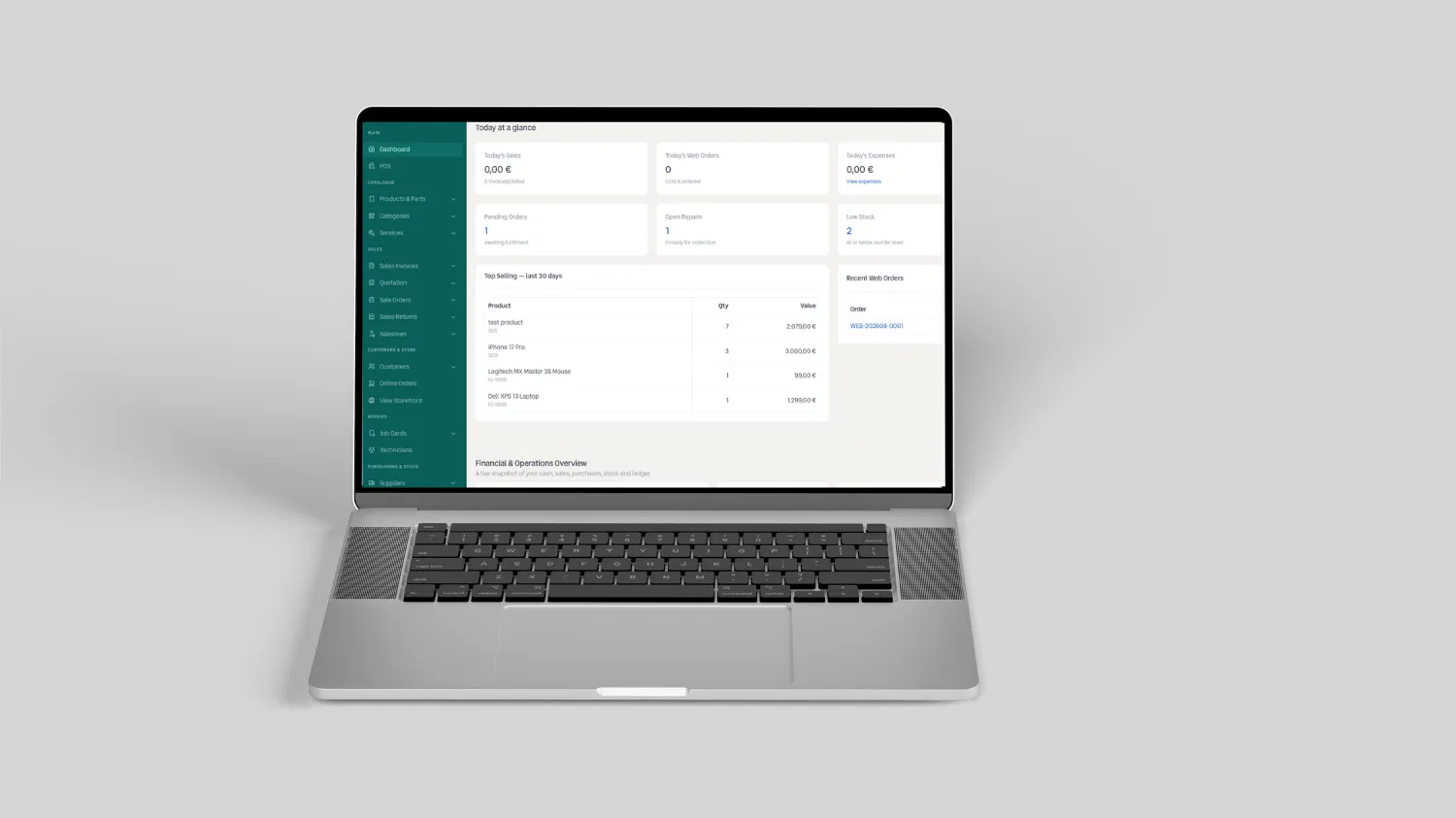
Retail POS and online storefront for an electronics business
In short: Loop2Tech built a custom point of sale system with a connected online storefront for an electronics retail and repair business in Karachi. One inventory table serves the counter and the website, repair jobs move through a tracked workflow instead of a paper diary, and the storefront runs on the same Laravel application rather than a separate platform that needs syncing. The system is live at pos.loop2tech.com.
What the business needed
The client ran two operations out of one shop: selling parts and accessories over the counter, and repairing phones and laptops. Those two operations were tracked in completely different places, and neither talked to the other.
Counter sales were recorded in a spreadsheet. Repair jobs lived in a notebook. Stock counts were done by eye. When a customer called to ask whether a screen was in stock, somebody walked to the shelf. When a repair needed a part, nobody knew whether taking it off the shelf would break a sale that had already been promised to someone else.
They also wanted to sell online. Every off-the-shelf option they had looked at solved one half of the problem: an e-commerce platform that knew nothing about repairs, or a repair ticketing tool that could not take a payment. Running both meant maintaining two stock figures and reconciling them by hand every evening.
Why this needed custom software rather than an off-the-shelf product
The deciding factor was the shared inventory. A part on the shelf can be sold to a walk-in customer, sold through the website, or consumed by a repair job, and all three routes draw down the same physical unit. No packaged product we evaluated modelled that third route.
Bolting a repair module onto a standard e-commerce platform would have meant a nightly sync between two databases, and a nightly sync means a window in which the website sells something the technician already used. For a business with single units of many parts, that window is where the customer complaints come from.
We wrote about how to make this call in general terms in our guide to custom software versus off-the-shelf. This project is the case where custom wins clearly: the workflow is genuinely unusual, and the cost of getting it wrong is visible to customers.
How the system is built
The whole system is one Laravel application with three interfaces sharing one database, so there is no synchronisation layer to fail.
| Interface | Who uses it | What it does |
|---|---|---|
| Counter POS | Shop staff | Barcode scan, cart, split payment, receipt, returns |
| Storefront | Customers | Category browsing, brand filters, wishlist, cart, checkout |
| Admin back office | Owner and manager | Stock, purchasing, repair jobs, pricing, reporting |
A single stock ledger (an append-only record of every movement in and out of inventory) sits underneath all three. Nothing writes a stock figure directly. Every sale, return, purchase, repair consumption, and manual adjustment appends a row, and the current quantity is derived from the ledger. That design makes the count auditable: when a number looks wrong, you can read the history that produced it rather than guessing.
Repair jobs as first-class objects
A repair job in this system carries a customer, a device, a reported fault, a technician, a status, and a parts list. When a technician assigns a part to a job, the stock ledger records the movement immediately, which removes that unit from what the storefront can sell.
Job status moves through a fixed sequence so the counter staff can answer "is it ready?" without walking to the workshop. Statuses are visible at the counter and drive the customer notification, which was the single change the client noticed most: the phone stopped ringing with status questions.
Checkout that tolerates a bad connection
Karachi retail runs through power and connectivity interruptions. A POS that stops taking money when the line drops is worse than a paper receipt book.
The counter interface holds an in-progress sale in local browser storage and only clears it once the server confirms the write. If the connection drops mid-sale, the cart is still on screen when it returns. This is unglamorous engineering that never appears in a feature list, and it is the part of the build the staff actually rely on.
What we built into the storefront from day one
The public storefront was treated as a search asset from the first sprint rather than something to optimise after launch, because retrofitting structure into a live catalogue costs more than building it correctly.
- Product structured data on every listing. Google documents two distinct classes of product markup, and a page where the customer can actually buy needs merchant listing markup rather than a product snippet. Our breakdown of which schema types actually matter covers the distinction.
- Crawlable category and brand pages. Filters produce real URLs with real headings, not JavaScript state that a crawler cannot reach.
- Server-rendered content. Every product page returns its full content in the initial HTML response, so crawlers and AI retrieval systems read it without executing JavaScript.
- WebP images with explicit dimensions. Set at upload, which protects Cumulative Layout Shift as the catalogue grows and staff upload photos from a phone.
- Repair service pages separate from product pages. Somebody searching for a screen replacement service has different intent from somebody buying a screen, and one page cannot serve both well.
The performance decision that mattered most
Product images arrive from staff phones at full resolution. On the first build, a single uploaded photo could be several megabytes, which would have destroyed Largest Contentful Paint on every page it appeared on.
We moved resizing and WebP conversion into the upload pipeline itself rather than relying on staff discipline. The original is kept, derivatives are generated on upload, and the storefront never serves the raw file. This is the fix we recommend in almost every audit, and it is the one clients most often skip because it is invisible until the catalogue is large.
Who this kind of build suits
A custom POS is the right answer when your operation has a workflow that packaged software does not model, and the wrong answer when it does not. Retail with an attached service arm, businesses where one stock pool feeds several sales channels, and operations where the reconciliation work between two systems has become somebody's daily job are the three patterns where the maths works.
If you sell standard products through standard channels, a configured Shopify store will serve you better and cost far less. We say so regularly, including to clients who arrived asking for custom work.
If you are weighing this up for your own business, our custom web solutions service starts with a scoping engagement that produces a written recommendation, including a recommendation not to build when that is the honest answer. Tell us about your operation and we will map the workflow before quoting anything.
Frequently asked questions
Can a custom POS system connect to an online store?
Yes, and the strongest version does not connect two systems at all. In this Loop2Tech build, the counter POS and the online storefront are two interfaces on one Laravel application reading a single stock ledger, so there is no sync interval and no window in which the website can sell stock that has already been consumed by a repair job. Integrations between separate systems are possible but always carry a lag, and that lag is where overselling happens.
How long does a custom POS build take?
A retail POS with a connected storefront is a twelve to twenty week build depending on catalogue complexity, payment requirements, and how many workflows beyond selling need modelling. Loop2Tech runs these in two-week cycles with a staging link open throughout, so the client sees the counter interface working with their own product data well before launch rather than at a final reveal.
What happens to sales if the internet connection drops?
The counter interface in this system holds an in-progress sale in local browser storage and clears it only after the server confirms the write, so a dropped connection leaves the cart intact on screen rather than losing the transaction. Any POS built for a market with unreliable connectivity needs this behaviour designed in from the start, because it cannot be added convincingly afterwards.
Is a custom POS better than Shopify POS for a small retailer?
For a straightforward retailer selling standard products, Shopify POS is the better choice and Loop2Tech recommends it regularly. Custom becomes the better option when the business runs a workflow the packaged product does not model, such as a repair operation drawing parts from the same inventory the storefront sells, or when reconciling two separate systems has become a daily manual task.
Who owns the code in a custom software project?
On every Loop2Tech custom build the client owns the source code, the database, the hosting accounts, and the documentation outright. This is written into the engagement rather than assumed. Any arrangement where the agency retains ownership of the application is a lock-in clause, and it is worth reading a contract specifically to check for it before signing.
- ClientConfidential (electronics retail and repair, Karachi)
- ExpertiseCustom Software, POS, E-commerce, Laravel
- Date28 August, 2026
More Work

Rania Jamal: portfolio website and AEO, GEO and SEO for a Saudi growth marketer

Frontier Publishers: website and enquiry system for an academic editing and publishing service

Alix Avien AE: e-commerce build for a growing makeup brand